顯示具有 Linux 標籤的文章。 顯示所有文章

2016-03-17

LIRC, IR Transmitter [ irsend ]

Schematic (with Raspberry Pi)

(yellow, 3.5mm middle) PIN 17 [3.3V] ==> + IR LED - ==> [GND] PIN 06 (black, 3.5mm peak)

# irsend SEND_ONCE SHM38K KEY_OK

IRSEND OPTION
-- Help
-h --help display usage summary
-v --version display version
-d --device use given lircd socket [/var/run/lirc/lircd]
-a --address host[:port] connect to lircd at this address
-# --count n send command n times

-- DIRECTIVE can be:
SEND_ONCE - send CODE [CODE...] once
SEND_START - start repeating [CODE]
SEND_STOP - stop repeating [CODE]
LIST - list configured remote items
SET_TRANSMITTERS - set transmitters NUM [NUM...]
SIMULATE - simulate IR event

2016-03-16

LIRC, IR key mapping & Learning

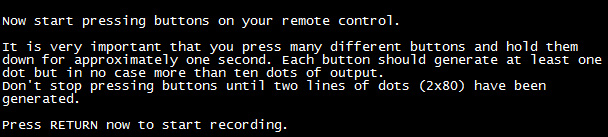
# irrecord –d /dev/lirc0 lircd.conf

Pi, IR Receiver


VCC3.3V (Pin-01) ------------- IR receiver ( from left Pin-03)
GROUND ----------------------- IR receiver ( from left Pin-02)
GPIO-18 (Pin-12) -------------- IR receiver ( from left Pin-01)

2016-03-15

Linux, oneTwoThree

001- tar.bz2
tar jxvf filename.tar.bz2

002- USB-to-Serial ==> CentOS-5.5 not support HL-340 driver by default. Suggest to used PL2303.
# lsusb
# dmesg


003- Find the path.
# whereis wish
wish: /usr/bin/wish8.5


004- dmesg
# dmesg | more ==> Show event by pages.
# dmesg -c ==> clear previous event.

005- kill (find out process id and then kill)
# kill -9 $( ps -ef | grep wdt | awk '{ print $2 }')

006- pgrep & pkill (list process name & kill)
# pgrep -l  [process name]
# pkill [process name]


2016-03-11

Pi, NFS server

NFS server (ip 10.1.1.16)
# apt-get install nfs-kernel-server nfs-common
# vim /etc/exports
     /var/tmp *(ro,sync)
# /etc/init.d/nfs-kernel-server stop
# rpcbind
# /etc/init.d/nfs-kernel-server start

2015-12-25

Dreamplug, IF IP GONE.

Create a network config file manually.
# vi /etc/network/interfaces
auto lo
iface lo inet loopback

auto eth0
iface eth0 inet static
address 192.168.1.1
netmask 255.255.255.0
network 192.168.1.0
broadcast 192.168.1.255

auto eth1
iface eth1 inet static
address 192.168.2.1
netmask 255.255.255.0
network 192.168.2.0
broadcast 192.168.2.255

# /sbin/ifup -a
Note-01:
# ifup -h

BusyBox v1.16.1 (2015-12-03 19:06:58 CST) multi-call binary.

Usage: ifup [-ainmvf] IFACE...

Options:
        -a      De/configure all interfaces automatically
        -i FILE Use FILE for interface definitions
        -n      Print out what would happen, but don't do it
                (note: doesn't disable mappings)
        -m      Don't run any mappings
        -v      Print out what would happen before doing it
        -f      Force de/configuration

Note-02: When "ifup -a" and get below message, try this

ifup: interface lo already configured
ifup: interface eth0 already configured
ifup: interface eth1 already configured

# ifdown -a
# ifup -a

2015-12-23

Dreamplug, uDHCPd options

File: /etc/udhcpd.conf
# Sample udhcpd configuration file (/etc/udhcpd.conf)
# Values shown are defaults

# The start and end of the IP lease block
start  192.168.0.20
end  192.168.0.254

# The interface that udhcpd will use
interface eth0

Dreamplug, DHCP server


2015-05-08

SED

sed --> stream editor

原有文件: test.file
文件內容:
  • this is line 1 on original test.file!
  • this is line 2 on original test.file!!
  • this is line 3 on original test.file!!!
刪除第三行
    • # sed -i "3d' test.file
    • # cat test.file
      • this is line 1 on original test.file!
      • this is line 2 on original test.file!!
Parameter
  • d ==> 刪除指定行號
  • c\<字串> ==> 以 <字串> 取代指定的行號
  • a\<字串> ==> 在指定的行號後新增一行 <字串>
  • a lot of parameters.

2015-04-24

ECHO

  • Parameter
    • -n : 不要在最後自動換行
    • -e : 若字串中出現以下字元, 則特別加已處理, 而不將之當成一般文字輸出.
      • \a : 發出警告聲
      • \n : 刪除前一個字元
      • \c : 最後不加上換行符號
      • \f : 換行且游標停留在原來位置
      • \n : 換行且游標移至行首
      • \r : 游標移至行首, 但不換行
      • \t : 插入 tab
      • \v : 與 \f 相同
      • \\ : 插入 \ 字元
      • \nnn : 插入 nnn (八進位) 所代表的 ASCII字元
Example

2015-04-02

Apache, httpd start FAIL

When no idea for httpd start FAIL without any error message.

Fixed,
check log file on /var/log/httpd/*, and there was a error log related NSS [error].
removed this kind of log file on /var/log/httpd/nss_error_log, and then httpd WORK. MY GOD.

2015-03-18

find - Linux command

Find specific string
  • # find ./directory -name “*.file extension” -exec grep -H “string” {} \;
Find specific filename
  • # find /directory -name filename

2015-03-17

Upgrade PHP5.4.0 from PHP5.2.10 on CentOS 5.5

5 Steps

1- Remove older version of PHP 5.2.10.
2- Add PHP 5.4
3- Check available PHP
4- Install new PHP
5- Finally

2015-02-12

NFS Server & Client

On NFS server (IP: 192.168.0.103) shared a writable folder /nfsdata to everyone under IP subnet 192.168.0.0/24

Server

  • # mkdir /nfsdata
  • # chmod 777 /nfsdata
  • # vi /etc/exports
    • /nfsdata 192.168.0.0/24(rw,sync)
  • # service nfs restart
Client
  • # showmount -e 192.168.0.103
    • Export list for 192.168.0.103:
    • /nfsdata 192.168.0.0/24
  • # mkdir /mnt/nfs
  • # mount 192.168.0.103:/nfsdata /mnt/nfs
  • # cp /etc/passwd /mnt/nfs
An other way to auto connect with NFS server when Client boot up.
  • # vi /etc/fstab
    • 192.168.0.103:/nfsdata /mnt/nfs     nfs     default,soft,intr,timeo=1  0   0
  • # mount /mnt/nfs
  • # reboot

More message for Login.

For local login.
(Default content)

  • # vi /etc/issue
    • Fedora Core release 4 (Stentz)
    • Kernel \r on an \m
For remote login.
  • # vi /etc/issue.net

Welcome message after get success login.

  • # vi /etc/motd

Tune on [NumLock] by default.

Add following on bottom on file rc.sysinit, and reboot the Linux.

Step-1:
  •  # vi /etc/rc.d/rc.sysinit
Step-2:
  • for tty in /dev/tty[1-9]*; do setleds -D +num < $tty
  • done
Step-3:
  • # reboot

2014-12-10

Disable daemon of Smartd to speed up boot process.


What is Smartd: Smartd does hard drive reliability monitoring.


Turn it to OFF

Example OS: CentOS 4.2 with Kernel 2.6.9-22 EL
  • # chkconfig smartd --list
    • smartd    0:off   1:off   2:on   3:on   4:on   5:on   6:off
  • # chkconfig smartd off
  • # chkconfig smartd --list
    • smartd    0:off   1:off   2:off   3:off   4:off   5:off   6:off