
2018-03-09
Eclipse, show line number.
Path: Windows --> Preferences --> General --> Editors --> Text Editors --> Show line numbers


2015-11-18

2015-11-13

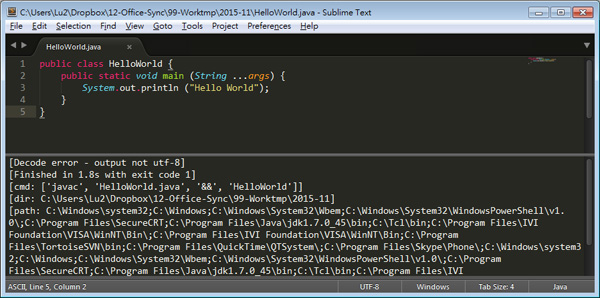
Sublime Text 3, JAVA coding environment setup (Way 1)
Note that this method will get UTF-8 problem after compile.
2015-04-02
SVN, first try.
Installation & Setup
- # yum install mod_dav_svn subversion
- # vim /etc/httpd/conf.d/subversion.conf
- make sure 2 lines upper this config file.
- LoadModule dav_svn_module modules/mod_dav_svn.so
- LoadModule authz_svn_module modules/mod_authz_svn.so
- modify these
- <Location /repos> # root path for http connection on /svn
- DAV svn # svn = connection method
- SVNPath /var/www/svn/repos # local svn path
- AuthType Basic #
- AuthName "Subversion repos" # show login information
- AuthUserFile /etc/svn-auth-conf # account & password located file
- Require valid-user # svn login required password
- #Satisfy Any # svn login password no required
- </Location>
Create first user
- # htpasswd -cm /etc/svn-auth-conf yourusername
Create other users
- # htpasswd -m /etc/svn-auth-conf anotherusername
Establish version control area
- # mkdir /var/www/svn
- # cd /var/www/svn
- # svnadmin create mts
- # chown -R apache.apache mts
- # service httpd restart
2015-03-05
2014-11-27
Sublime Text 3, How to see her in detail?
Content List:
A. PASTE Multiple Texts
B. MOVE Middle Texts
C. MOVE Forward Multiple Lines


A. PASTE Multiple Texts
B. MOVE Middle Texts
C. MOVE Forward Multiple Lines
2014-11-18

2014-11-05
yEd - Flow Chart tool
Payment: Free
Download place on Official web: http://www.yworks.com/en/downloads.html#yEd
This is a green software that so no need to install it into the Windows and Linux platform.
And JAVA JRE is required before the software installation.

Download place on Official web: http://www.yworks.com/en/downloads.html#yEd
This is a green software that so no need to install it into the Windows and Linux platform.
And JAVA JRE is required before the software installation.
2014-09-12
Disable Sublime Text 3 version update.
Way 1: Works
Under Windows 7 64bits
Fill this in "Preferences / Settings - User

=========================
Way 2: Looks not work sometimes.
Under Windows 7 32bits
Modify "hosts" file on path C:\Windows\System32\drivers\etc
Fill 2 lines into hosts file to STOP SUBLIMETEXT UPDATES.

Under Windows 7 64bits
Fill this in "Preferences / Settings - User
=========================
Way 2: Looks not work sometimes.
Under Windows 7 32bits
Modify "hosts" file on path C:\Windows\System32\drivers\etc
Fill 2 lines into hosts file to STOP SUBLIMETEXT UPDATES.
- 127.0.0.1 sublimetext.com
- 127.0.0.1 www.sublimetext.com
2014-06-20
Sublime Text 3, Package - TrailingSpaces
Update:
TrailingSpaces not work on new SublimeText 3.2.2.
qasm_highlighting: Could be use this for the same function.

- Highlight unused Space
- 顯示多餘空白字元. 移除可 resize file to smaller.
SHOW Unused SPACEs
- Choose "Trailing Spaces: Toggle Trailing Spaces Highlighting"

REMOVE Unused SPACEs
- Choose "Trailing Spaces: Toggle Trailing Spaces"

2014-05-02
Sublime Text 3, Package Control
Have a useful package into Sublime Text.
Package source: http://wbond.net/sublime_packages
There are so many packages supported Sublime Text.
Have a first package installation for example.
2014-03-05
Sublime Text v3056, Turn OFF the Auto Upgrade Feature.
Important note that do not upgrade the version from SublimeText own upgrade function.
"Help --> Check for updates...", due to nothing is free.
Software needed
a- OS Windows 7 with SP1.
b- Original SublimeText 3056 installation package.
c- A unlimited SublimeText 3059 execution file, like "sublime_text_sled_2_x86.exe".
Process
1- Assume you have done the SublimeText 3056 installation, so you can ignore above items a & b.
2- Rename "sublime_text_sled_2_x86.exe" to "sublime_text.exe.
3- Move it to folder "Program File / Sublime Text 3" and then replace original one.
4- Your SublimeText version also move to v3059.
5- Den Den... You will not see any upgrade message pop up anymore.

"Help --> Check for updates...", due to nothing is free.
Software needed
a- OS Windows 7 with SP1.
b- Original SublimeText 3056 installation package.
c- A unlimited SublimeText 3059 execution file, like "sublime_text_sled_2_x86.exe".
Process
1- Assume you have done the SublimeText 3056 installation, so you can ignore above items a & b.
2- Rename "sublime_text_sled_2_x86.exe" to "sublime_text.exe.
3- Move it to folder "Program File / Sublime Text 3" and then replace original one.
4- Your SublimeText version also move to v3059.
5- Den Den... You will not see any upgrade message pop up anymore.
2014-02-27
Unicode
Unicode 編碼中 "a" 為 97. Why???
bin (Binary): 二進位 / 0.1
oct (Octal): 八進位 / 0.1.2.3.4.5.6.7
dec (Decimal): 十進位 / 0.1.2.3.4.5.6.7.8.9
hex: (Hexadecimal): 十六進位 / 0.1.2.3.4.5.6.7.8.9.A.B.C.D.E.F
依下表得知 unicode 的 "a" 為十進位的 "97"
unicode 和 dec 的轉換

2014-02-13
Eclipse Text Searching
Search the text what you would like to show on workspace.

2014-02-12
Eclipse Basically
Establish your first JAVA project within IDE Eclipse.

- Choose " File --> New --> Java project ".
- Fill " lu.ide.first " in Project name field.
- Make sure a option of " Create separate folders for sources and class file "is checked on Project layout.
- Press " Finish " button to create your first JAVA project.
2014-02-11
Installing RXTX for Serial Communication with Java in MS platform.
01- Get RXTX from here.
- Filename: rxtx-2.1-7-bins-r2.zip
- Link: https://www.dropbox.com/s/gt061ayzxe4kaoi/rxtx-2.1-7-bins-r2.zip
Path1: rxtx-2.1-7-bins-r2/Windows/i368-mingw32/
- rxtxParallel.dll
- rxtxSerial.dll
Path2: rxtx-2.1-7-bins-r2/03- Copy there
- RXTXComm.jar
2 files rxtxParallel.dll & rxtxSerial.dll to [ C:\Program Files\Java\jdk1.7.0_45\jre\bin ]
1 file RXTXComm.jar to [ C:\Program Files\Java\jdk1.7.0_45\jre\lib\ext\ ]
訂閱:
文章 (Atom)